WS-SE

Overview

Nokia’s reference Optical Networks solution that realizes hierarchical multi-tenancy is comprised of multiple layers, including flexible, programmable Network Elements, tenant-aware SDN control respecting the constraint of tenancy in the path computation, hierarchical tenant resource allocation/monitoring, and WaveSuite Service Enablement (WS-SE) external APIs that can integrate with existing OSS/BSS systems.

The Service Enablement (SE) applications layer in the solution provides monitoring, reporting, fulfillment and inventory functions for multi-tenant services in a virtualized network. These applications share a common inventory that models network virtualization, service abstraction, and hierarchical multi-tenancy relationships across resources and services. Application functions can be accessed through tenant service portals or integrated into the service provider BSS layer through open northbound interfaces.


Architecture
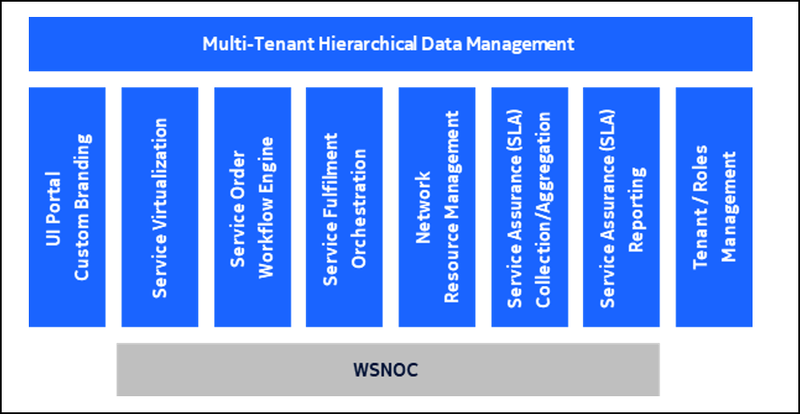
WSSE_Architecture


Key Features

  • Optical NaaS


    Provides the ability for Network Operators to advertise and sell network bandwidth to service Resellers and direct Subscribers using branded UI portals. Resellers and Subscribers can use the network as a service to order network bandwidth through flexible service orders.

  • Hierarchical Multi-Tenancy (HMT)


    Enables the creation of Reseller and Subscriber business relationships through the management of sub-tenants within a hierarchical multi-tenancy data model. Virtualized service entities can be provided to or provided by members of the relationship.

  • Service Virtualization with manual and automated fulfillment workflows

    Provides the ability to virtualize service locations, specifications, and existing/provisioned services that are advertised/sold to service Resellers and Subscribers. This virtualization allows dedicated sub-tenant (reseller or subscriber) UI portals to provide a specific view of provided and providing services that can be managed and monitored as required.

  • Bandwidth on Demand


    Service bandwidth can be requested by Resellers and Subscribers on-demand which includes support for scheduled service provisioning start and termination times.

  • Service Assurance Collection/Aggregation and Service Level Agreement (SLA) Conformance Reporting

    Support for stats collection and aggregation of key availability, utilization, and latency metrics that can be viewed and exported for service assurance / SLA conformance reporting.

  • Network Resource Management

    Manage association of physical network equipment to virtualized locations and management of network service lifecycle including orchestration of service provisioning for automated fulfillment with automated provisioning.

  • User Audit Logging (UAL)

    Persisted records of user-initiated actions which can be viewed by tenant initiation of action or tenant affected by the action.

  • Service Fulfilment Workflow Engine

    Have built-in workflow engine with designated service fulfillment workflow designed to provide maximum reliability in executing process of service virtualization for both manual and automated processing. Workflow incorporates error handling, automated retries, and selectable options for workflow execution.

  • Event Notification Service Subscriptions

    Supports user subscriptions to defined service order and service lifecycle events. Users can subscribe to selected events to receive events via REST Hooks.

  • Open APIs


    All operations are available to external clients via open REST APIs with complete Swagger UI and API documentation support

WS-SE Releases

To view the list of new features and enhancements supported for the release, see WS-SE Releases.

Prerequisites and Dependencies

  • See the Lab Catalog to request a lab environment.
  • A valid user account with a user name and password is configured on the WS-SE application.
  • General knowledge of REST APIs, and Optical Network Management.

Documentation

Use Cases

To view the list of use cases supported as a part of 'How To', see WS-SE How To.

On this page