WS-NOC
Overview
The Nokia WaveSuite - Network Operations Center(WS-NOC) centralizes and consolidates the management of optical networks. WS-NOC is an integral part of any optical networking solution, whether stand alone or integrated with the Nokia Network Services Platform (NSP) SDN solution, or a third party SDN solution, or with other OSSs.
WS-NOC centralizes multiple network management and operations functions in one unified platform for the Nokia Optical portfolio. It allows NOC operators to deploy and manage the network over the total life cycle.
WS-NOC application can be integrated with other OSS application using REST APIs . The REST APIs provide an interface to interact with WS-NOC application through URI path.
Architecture
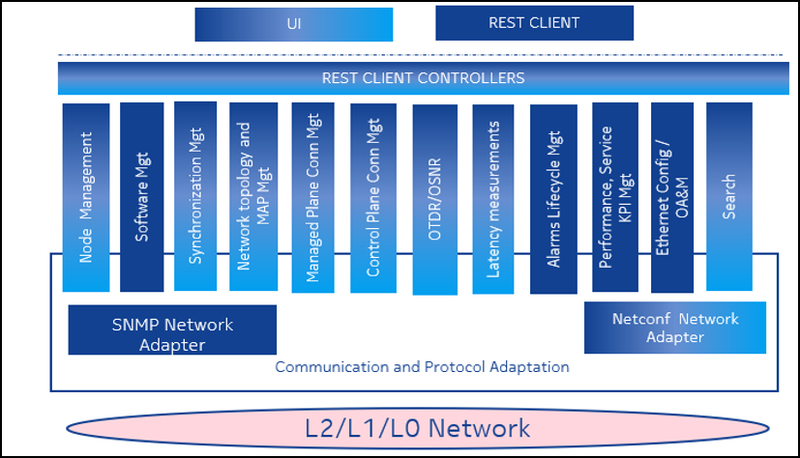
The WS-NOC architecture consists of a suite of modular components, with each component specialized in a well-defined task or over a specific network technology. WS-NOC performs Connection management using the control plane or managed plane, Layer 2 Transport management, Fault management, and Performance management. WS-NOC also supports Node and Equipment management, Software management, Alarm/PM data collectors, and protocol adapters. All applications and components are integrated under a Graphical User Interface (GUI).
Key Features
In addition to supporting NE portfolios, WS-NOC also supports a diverse set of functionalities which facilitates the NOC operations with ease.
- Insights: Insights access the knowledge of the WaveSuite products to provide value-added information about network status, health and capacity. By highlighting statistics, observations and trends, users can get early warning for upcoming problems, and information to allow them to make decisions to better manage their network. Most of the insight data cannot be accessed from a single GUI screen, rather they synthesize data across the system to isolate key metrics and guidelines. Look for this feature to continue to evolve, pulling in useful information from across the WaveSuite product portfolio.
- Customized dashboards: WS-NOC provides the ability to customize dashboard contents. From the main menu (Operate->Configurable Dashboard) the user can select from numerous filters and chart types to display information about their network and equipment. Pie, line and bar charts are available and can be positioned in several configurations and sizes, to allow users to focus on what they consider to be most important. Charts are updated dynamically, and clicking on each chart segment launches a filtered list of items that correspond to the chart display. The chart configurations are saved on a per user basis. Dashboards can also be accessed by a series of icons on the left side of the screen, which reduces the time to find and navigate to dashboards of interest.
- Closed loop automation – OTDR: As a next step in seamlessly orchestrating intelligent automation to network anomalies like Fiber cut or high span loss, WS-NOC automatically initiates OTDR scan to identify the fiber cut location or change in the fiber characteristics that would be leading to high span loss. Further, the details of the physical connection, scan details, comparison with baseline, fiber cut location, list of impacted connection is compiled in a PDF document and sent as email automatically to configured recipients to enable further automated actions.
- Email alerts for pre-configured alarms, system events: An WS-NOC administrator has the ability to create policies for e-mail notifications with alarm notification rules and a list of recipients. When a filter is matched, an e-mail is sent to the list of recipients. The e-mail content is a set of text-based alarm fields and a link to the relevant functional area. E-mail are sent based on the SMTP e-mail server configured.
- Zero Touch Provisioning: ZTP allows a user to create a reservation connection between PSS and have the system automatically extend the connection when the customer premise equipment(PSD) is discovered by WSNOC through trap-based discovery. ZTP consists of the following phases:
- Reservation Phase: During the Reservation Phase, the resources within the 1830 PSS network are reserved but are not implemented in the network.
- Implementation Phase: Resources within the 1830 PSS network are implemented in the network.
- Commissioning Phase: The CPE is discovered, the service connection is extended to the CPE, and post commissioning service testing is performed (when supported by the connection).
- NE Quarantine: Quarantine is WSNOC’s self-defense mechanism that helps prevent performance slow-down due to excessive event processing, in case one or more NEs are flooding events. The feature is policy driven that automatically detects excessive events from NE(s) and ensures the entire lifecycle (IN & OUT of the Quarantine) is handled automatically without NOC user intervention. The feature uses Prometheus for data dimensioning and allows for full customization of feature triggering condition. Feature is optional during the time of installation and supports all SNMP capable NEs.
- Anti Sabotage and Anti Theft: The Anti-Theft feature is a mechanism implemented on WS-NOC and NE that allows to block the usage of PSS cards when they are operated in a network that is different from the ones they were originally placed into. Anti-Theft feature can be enabled at WSNOC installation time, having a valid Anti-Theft license. When the feature is enabled, Network Elements managed by WS-NOC are provisioned with an Anti-Theft key and will only operate in networks managed by instances of WS-NOC with the same Anti-Theft key which is part of the license file. It is not possible to exchange cards between networks managed by WS-NOC instances with different Anti-Theft keys. It is not possible to rollback this feature once enabled.
Optical Network Releases
To view the list of new and updated features supported for the release, see Optical Networking Releases.
Prerequisites and Dependencies
- Click the Lab Catalog to request a lab environment.
- General knowledge of REST APIs, and Optical Network Management.
Documentation
To view the supported documents, see WS-NOC documentation.
Use Cases
To view the list of use cases supported as a part of 'How To', see How To in WS-NOC.
 /
/